100% Security
Instant Download 24/7
10+ Years of Service
0 Reviews
$19.95
$39.95
Save 50%

Genie Timeline Home 10

Includes a 1-PC, non-expiring lifetime license

Offer Ends
+ login to earn points
Platform
Windows 10
Windows 7 (32 bit)
Windows 7 (64 bit)
Windows 8
Windows Vista
Windows XP
Version
10
Manufacturer
Twitter
Last Updated
28 February 2026
Download Size
13.00 MB

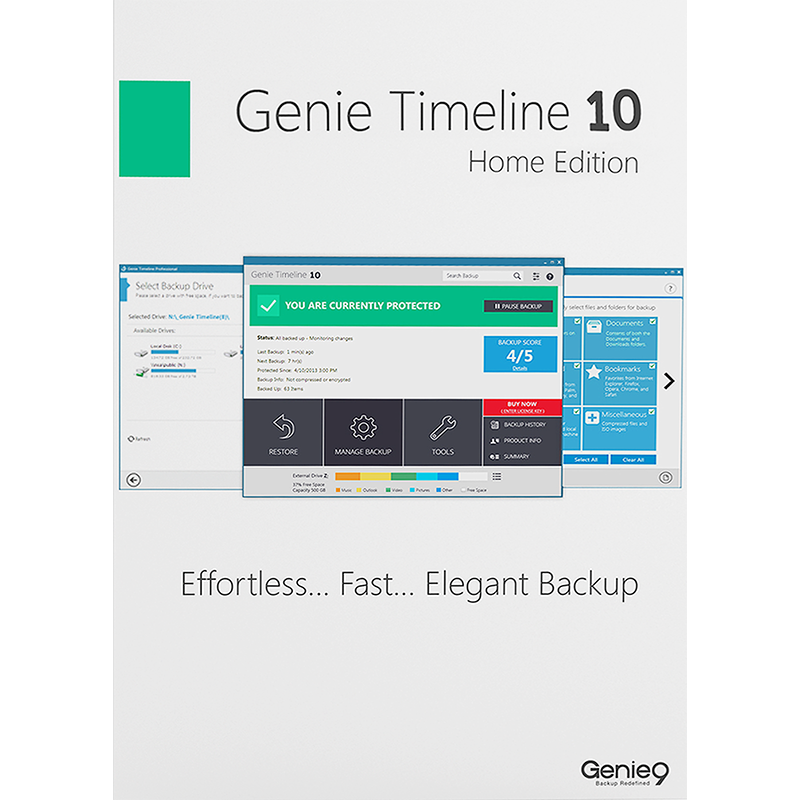
Genie Timeline Home 10 is a very easy-to-use backup tool which works almost entirely automatically.

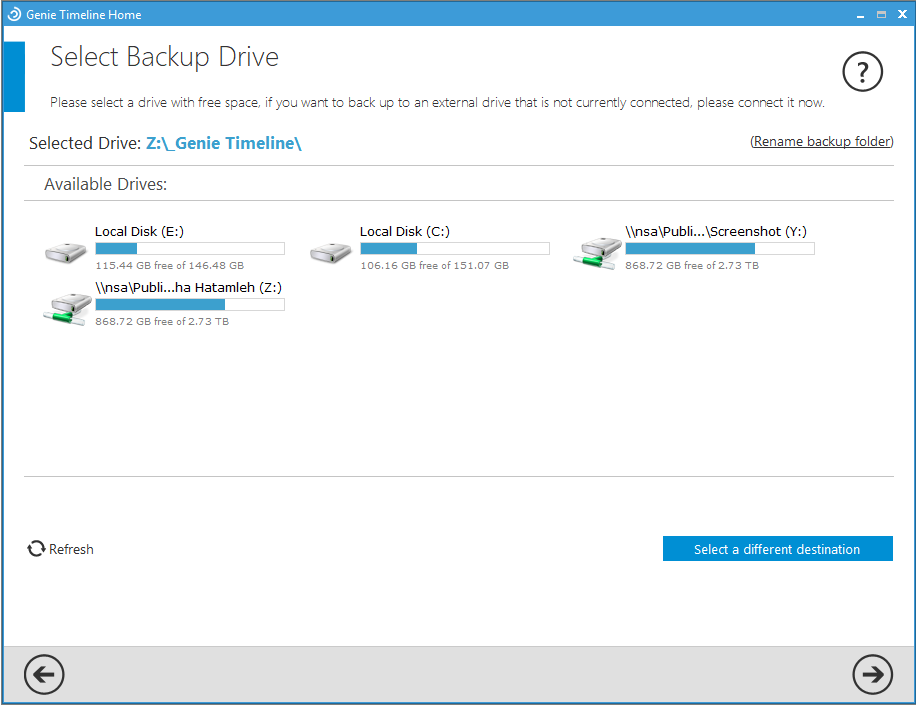
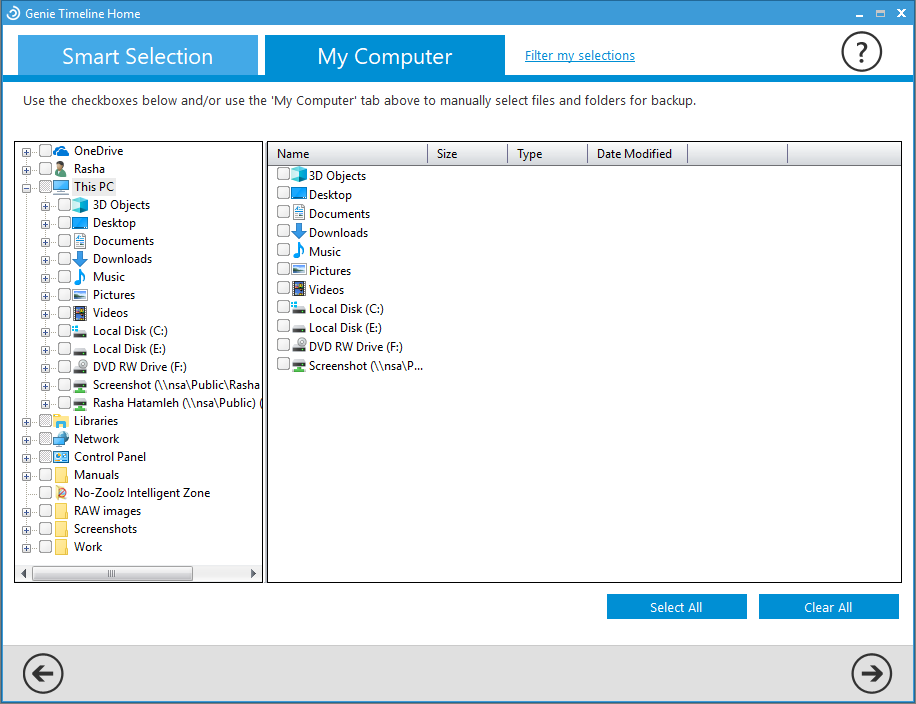
When you first launch the program you'll have to select the destination drive for your backups (a network drive is just fine). You can then check boxes to confirm the type of file you'd like to back up (Office files, pictures, emails, music, documents and so on). And if you want to define specific files or folders to back up then you can do that, too.

Once this is all set up, though, there's no need to do anything else. The program runs when it's necessary (which means when your files have changed and your PC is idle). If it's interrupted, perhaps because your PC closes down or reboots then the program will resume later, just where it left off. And if you need to restore one or two files at some later date, or your entire backup, then the Restore tool makes it easy.

In addition to all this, Genie Timeline Home has been enhanced with plenty of new features.

Backup speeds are twice the speed of the previous version, for instance.

The program is smarter, less likely to store multiple copies of the same file, so reducing backup space requirements.

Explorer folder icons will have a marker to indicate which ones are backed up. And it's now quicker and easier to restore the files you need.

The Home edition allows you to run your backups on a schedule, and more frequently (every 30 minutes if you like, as opposed to every 8 hours for the Free edition). It supports Disaster Recovery, so you can restore your PC even if Windows won't boot. Backups can be compressed to reduce space, a Game/ Movie mode reduces alerts, and you're allowed to use it commercially.

Genie Timeline Home 10 includes a 1-PC, non-expiring lifetime license.

Review by Mike Williams.

Performance Issues?

Most system performance issues are often a result of other software clashing with your brand new software. For instance, security software can clash with a background process, such as a system maintenance tool or defragmentation software. Another cause of system slowdown, is a result of two software applications performing a similar task. As an example, Windows includes a firewall switched on as a default. Your new security suite is likely to include a firewall. You only need one firewall running. In this example, try turning off your system firewall.

Uninstalling Your New Software

Occasionally you may need to either temporarily or permanently remove your new software.

On a Windows computer, go to the Control Panel and choose Programs and Features. Locate the program within the list, then click it to highlight it. Finally, click the Uninstall button at the top of the list and follow the instructions to remove the program from your PC.

On an Apple Mac computer, using Finder, locate the Applications folder. Within the Applications folder, find the name of the application you wish to remove. Simply drag the icon to your Trash icon in your dock. Empty the Trash to remove the files from your computer.

Still Having Problems?

If you cannot solve your system performance issues or are struggling to remove your software, we advise contacting the software manufacturer. If you placed an order, see the section in the order which states Support options. Alternatively, go to the Contact Us page to contact store support directly.

Frequently Asked Questions

Find quick answers to the most common questions about our services and platform

How Do I Order Software?
Simply select the software you want to order by clicking the "Buy Now" button or, where the option exists, clicking on "Upgrade". The upgrade option enables you to upgrade from a previous version of the software. When you click "Buy Now" you will be taken to your shopping cart, powered by PayPro, where you can choose a payment option and then receive your download and serial code within seconds, after making your payment.
What Is The Extended Download Option?
When you place your order, you might see an option for "Extended Download Option" in your shopping cart. After you order software online, you will receive a digital download and a serial code by email from PayPro. If you create a PCWorld Software Store account, you normally have 30 days from placing the order to download your software, if you need to download again in the future. You can choose to extend this to two years, enabling you to login to your account and find your download, serial code(s) and your original invoice. Ideal if you need to re-install your software, suffer from a system crash or buy a new PC. Simply head to the "My Account" section on this store to access previous orders.
How Do I Access My Order, After Ordering?
Your order will be emailed to you from PayPro. In addition, you can find your order in your store account for 30 days after ordering. You need a store account and, for security reasons, the email address used in the order, must match your store account email. Simply create a store account (if you haven't already) and login to find your order information. If you purchased 'Extended Download Insurance' you can find and access your order for up to two years from the date you placed your order, rather than the standard 30 days.
Why Are Some Prices Dynamic?
This store supports fixed pricing in USD, EUR, GBP, AUD, NZD and CAD currencies. If you purchase in USD or GBP the price on the store reflects the currency in your shopping cart. If you are based outside these currency regions, you can still order, but the currency will be converted from the fixed USD price. Alternatively, you could pay in USD and simply allow your card issuer to convert from USD to your local currency (although a small conversion fee may apply).
Why Was My Card Declined?

In most instances this will be due to fraud protection from your credit card provider. Most card companies require you to signup to "3D Secure" which will send a 6-digit code to your mobile phone and/or your email address to make sure it's you placing the order. This was designed to help prevent against online fraud, so card companies make sure you are the person paying for your goods by authenticating the transaction.

Although you have protection when you purchase goods, online, through your credit card, your company may decline a large order or an order made through an online store for the first time. If your card is declined, we suggest you speak with your card provider and/or your bank. You can also pay through PayPal, Google Pay, Apple Pay, wire transfer or other payment formats.

Can I Ask For A Refund?

We strongly suggest you download and test trial software before placing your order. Trial software is provided to enable you to determine whether it's applicable for your system and meets your requirements. Once you are happy with your trial software, place an order. Digital downloadable software often cannot be refunded unless the order was placed in error and the order remains completely unused.

Activated software cannot be refunded as the code becomes the property of the customer and cannot be resold or reused. If you ordered in error or there is another problem with your order, contact PayPro directly for a refund.

Who Keeps My Order Information?
Your transaction is between yourself and our e-commerce provider, PayPro Global. PayPro will NEVER re-use your information, pass on to a third party and will not contact you unless you contact them with a query. Your credit card information is not kept on file and is not stored by any third party. If you ordered Extended Download Insurance with your order, we retain basic information about your order on our secure server. This includes your name, email address (required to access your account), serial codes ordered and download links to your software. No-one has access to this information apart from yourself. This information is only available once you have registered your account using the email address you used to place the order.

Write a review

Find What You Need!
Payment Methods
Trusted Partners
AVG F-Secure Auslogics McAfee O&O Software Bitdefender
100% Security
Instant Download 24/7
10+ Years of Service